Sep 3, 2026
In my previous post, we discussed the option of garnishing a debtor’s bank account when they play hard to get. But what if garnishment isn’t enough? Initiating a land sale is another powerful enforcement remedy.
Step One – Wait
A creditor may not take any step to sell land until four months after filing the Writ with the Sheriff. Furthermore, the Sheriff cannot hold a land sale until six months after filing.[1]
However, that first four-month window shouldn’t go to waste. Use this time to gather the following required documentation so everything is ready to go. Keep in mind that different Sheriff’s offices may have specific document requirements, so always confirm in advance.
Step Two – Gather Documents While You Wait
- Issued Writ of Seizure and Sale
My previous blog discussed different method of issuing a Writ – through WritFiling or the court registrar. If issued through the registrar, remember to file it with the Enforcement Office in the region where the debtor lives or owns assets. If issued through WritFiling, it is deemed both issued by the court and filed with the Sheriff (Enforcement office). Either way, ensure you have a copy of the issued Writ.
- Direction to Enforce (60F)
File the Direction to Enforce (Form 60F) setting out the date of the Order and amount awarded; application post judgement interest rate; enforcement costs; dates and amounts of any payments received; and the amount owing, including the post judgment interest.[2]
This document formally directs the sheriff to enforce the Writ for the amount owing, interest and applicable sheriff’s fees and expenses.
- Copy of Judgments
Provide copies of the Judgment and any costs award Judgment together with the Direction to Enforce.
- Parcel Register
Download an up-to-date Parcel Register from the Land Registry Office. My previous blog breaks down how to pull a parcel register from ONLand without a PIN.
- Copy of the Deed and All Registered Encumbrances
Download all underlying instruments including Deed or Transfer, mortgages and line of credits from the Parcel Register. My previous blog provides a detailed walk-through of the parcel registers, including how to identify and download these instruments via ONLand.
- Mortgage Statements
You must provide all existing mortgages statements and encumbers registered on the title. To obtain mortgage statements, you may contact mortgagee using the contact information listed on the instrument. Provide them with the issued order, issued writ and the parcel register.
The Supreme Court of Canada decision in Royal Bank of Canada v. Trang held that the execution debtor implicitly gave the mortgagee consent to disclosure at the time the mortgage is granted.[3]
You may also obtain the statements by way of Debtor Examination or Court Order.
- Municipal Tax Statement
Contact the local municipality for a tax certificate of the property, provide the supporting documents, and explain that enforcement for a land sale is underway. Note that municipal application fees may apply.
- Certified Appraisal or Certified Letter of Opinion (Up-to-Date)
Retain a licenced appraiser for a certified appraisal or certified letter of opinion detailing the property’s current value (evaluated within the last six months). If the asset is a commercial property, a formal certified appraisal is required.
The report should include the municipal address and physical details of the property, such as street number, construction type (e.g., single-unit, semi-detached, condominium), layout (e.g., multi-story, split-level), and heating and garage specifications.
- Deposit of $5,240
Prepare a cheque of $5,240, payable to the Minister of Finance, to cover the sheriff’s costs of enforcement.
- Letter to the Sheriff
Include a formal instruction letter to the sheriff containing:
- Clear written instructions to sell the property of the execution debtor
- An up-to-date calculation of post-judgment interest
- Marital and ownership details: whether held in joint tenancy or tenancy-in- common, whether the property could be considered a matrimonial home, marital status of the debtor, and the current whereabouts of the spouse or any co-habiting individual
- Confirmation of whether the creditor or representative will attend on the day of sale
Step Three – Submit
Submit the completed document package and fee directly to the sheriff to schedule the sale and check periodically for updates.
While preparing for a land sale takes time and detailed documentation, it remains one of the most effective ways to recover substantial debts. By getting documents ready during the mandatory waiting period, you position yourself to move quickly and maximize your chances of a successful recovery.
Jennifer Jiang
Nothing contained in this post constitutes legal advice or establishes a solicitor-client relationship. If you have any questions regarding your legal rights or legal obligations, you should consult a lawyer.
[1] Rules of Civil Procedure, R.R.O. 1990, Regulation 194 [“Rules”], Rule 60.17 (17) and (18)
[2] Ibid at Rule 60.07 (13)
[3] Royal Bank of Canada v. Trang 2016 SCC 50 at Para 49
Sep 11, 2025
In my last blog, we explored on how to pull a parcel register without a PIN (Property Identification Number) via ONLAND. In this post, we will walk through how to read parcel register and how to search for instruments associated with a property.
Below is a detailed description of information found in a sample parcel register provided by ONLAND.

Key Information Found in a Parcel Register
When reviewing a parcel register, always begin by checking the date of the document in the top-right corner of the first page, to make sure it is up-to-date.
Then you will find the following information:
PIN – Each property is assigned with a unique number, which identifies the block and lot number. For example, PIN 25050-1111 means 25050 is the block number and 1111 is the lot number.
Legal Description – This section provides a formal description of the property’s location, boundaries, and conditions. For example, S/T indicates that the property is subject to certain rights, such as easements, (e.g., a shared driveway or hydro easement). T/W (together with) indicates that the property is granted rights over another piece of land. It’s important to review the related legal document to fully understand the nature of any easements.
Current Owner(s) and Type and Percentage of Ownership: The register shows the name(s) of the current owner(s) and type of ownership, such as joint tenancy or tenancy in common. For tenancy in common, the register specifies the percentage of ownership for each owner.

Registered Instruments: This table in the parcel register lists registered documents related to the property, known as instruments. These can include transfers, mortgages, liens, or easements. Each entry includes the transaction date and the registered instrument number.
Transfer – This shows transfer of ownership from previous parties to current ones. Typically, “Parties From” shows the seller(s) and previous owner(s) and “Parties To” shows the buyer(s) and current owner(s). It also shows the purchase price. If you download the transfer instrument, you can access more details, such as previous owner(s)’s address for service, the relationship between the transferors, whether the transfer was authorized under a Power of Attorney, the lawyers acting for the parties and the amount of the Land Transfer Tax paid.

Charge – This shows a registered mortgage or lien and the amount secured against the property. Typically, “Parties From” identifies the mortgagor (the borrower, typically the current owner), and “Parties To” indicate the mortgagee (the lender, typically a financial institution). If you download the instrument, you can review more detailed information such as the address for service for the mortgagee, the payment date, standard charge terms file number and any additional provisions. Standard charge terms can be downloaded for free, which I will explain further below.

How to Download an Instrument
If you go to ONLAND.ca, you can download the parcel register under the “Property” section. However, for the registered instruments, you will have go to “Documents” section, choose the correct Land Registry Office and select “Instruments, Plans and Evidence”, then enter the registration number of the instrument, and click search. It costs $3 plus HST per document. 
How to Download the standard Charge Terms for the Charge/ Mortgage
If you wish to review further information regarding to the mortgage, you can download the applicable standard charge terms. The Charge instrument provides the standard charge terms file number. To obtain a copy, go to “Documents” section, select Standard Charge Terms, and search by the file number.
Conclusion
Parcel registers provide a detailed description of a property. You now have a clearer understanding of the property’s history and financial encumbrances. We really appreciate that ONLAND makes these records more accessible. However, the interpretation of parcel register data can be complex, so it is always important to consult with a lawyer.
Jennifer Jiang
Nothing contained in this post constitutes legal advice or establishes a solicitor-client relationship. If you have any questions regarding your legal rights or legal obligations, you should consult a lawyer.
Feb 14, 2025
Are you investigating property ownership or searching for uncovered claims, liens or encumbrances in Ontario? The province’s land registration services are ONLY available online through ONLAND. ONLAND is the official portal for land records, allowing you to search by Property Identification Number (PIN), address, instrument, or map. But what if you don’t have the PIN or no records linked to the address can be found in the system? Here’s how you can still proceed.
Step One: Identify the Land Registry Office (LRO) Number
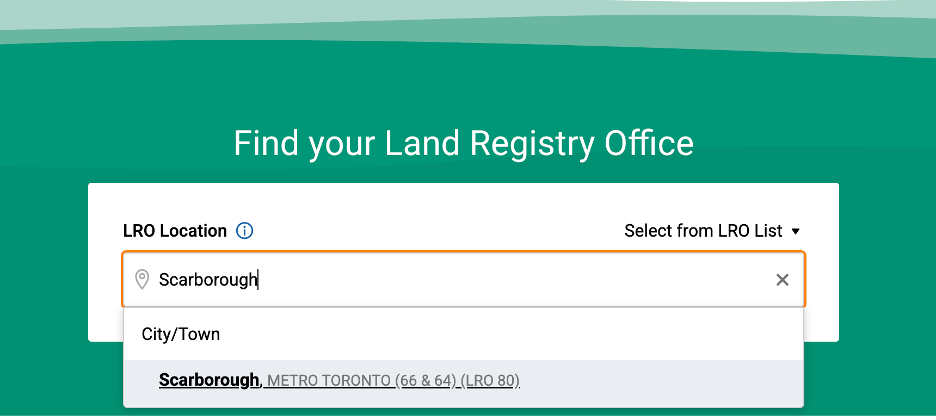
Your first step is to determine the correct LRO number. Enter the city or town name in the search bar on the ONLAND portal. The corresponding LRO location and number will be displayed. For example, tying “Scarborough” will show “Metro Toronto” with LRO number 80.
Step Two: Access Property Information
Once the LRO is identified, access the “Search” option under “Property” section, which allows you to search by PIN, address, instrument or map.
If you don’t have the PIN, you can still conduct searches by address or map feature.
Search By Address
This can be done by entering the municipal address (mailing address) of the property. Please note that you should enter only the street name, without additional identifiers. For example, for “Adelaide St E”, enter “Adelaide” only.
However, some properties may not be linked to a municipal address in the system. This is especially common for properties like farmland and cottages. If your search yields no records, don’t give up – you can switch to a map-based search to continue.
Tip: Search Neighbouring Properties for PIN Information
If the address search doesn’t work, one helpful tip is to search other street numbers under the same street name. If a neighbouring property is linked to its municipal address, you can identify the first five digits of the PIN, which is the same for all properties in the general block. This information can help you narrow down your search to the correct area when using the map feature.
Search By Map
By selecting “Map”, ONLAND will display Ontario Electronic Property Index Maps (“ONLAND Maps”), showing all the properties in the area. Make sure you are viewing the correct LRO map and turn on the “geographic information” as references to assist with identifying the property‘s location.

Identify the Block by Using “Search by Street”
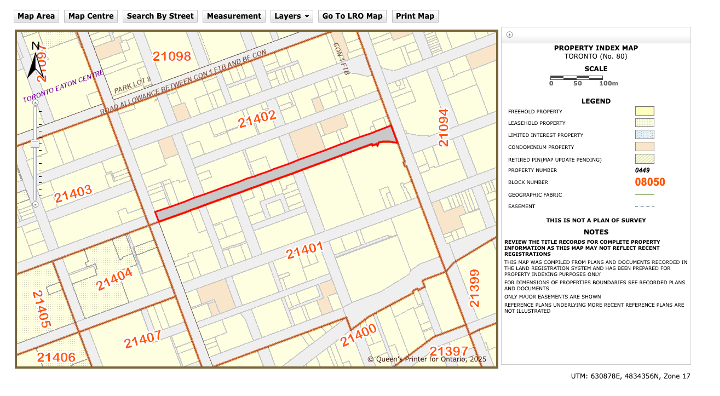
To further narrow down your search, use the “Search by Street” feature. Enter the street name without any indicators. For example, searching for “Adelaide” will display a list of all the streets containing “Adelaide”. From there, you can sort through the options and select the correct street. Once the correct street is selected, browse the map to find your block and the relevant properties.
For example, in the screenshot below, I can identify the “Adelaide” street between block number 21402 and 21401.
Identify the Property by Using Google Map
Another helpful method is to use Google Maps to familiarize yourself with the property’s surroundings and identify any notable landmarks features.
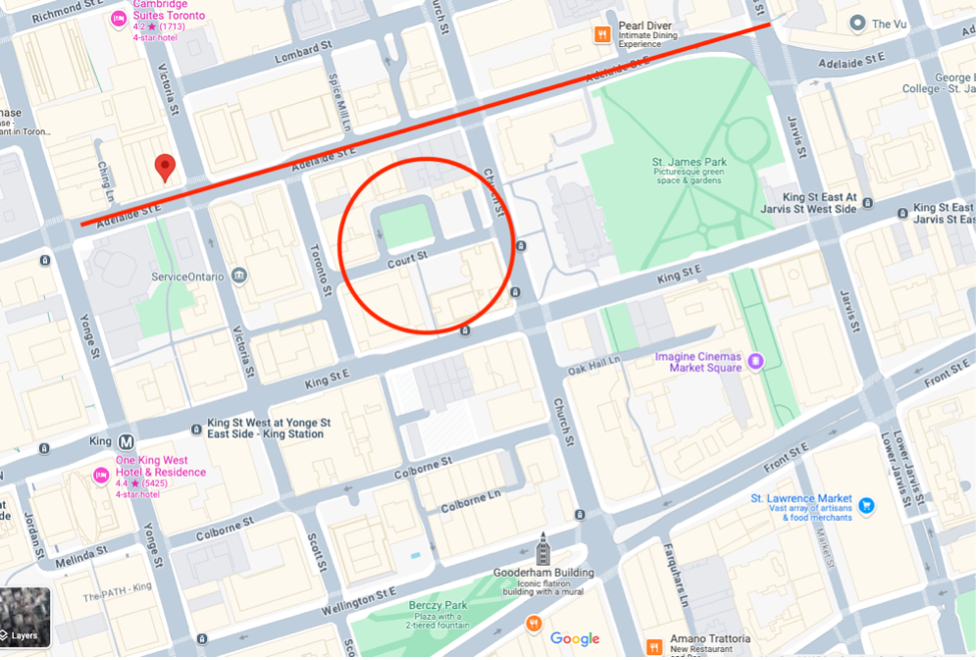
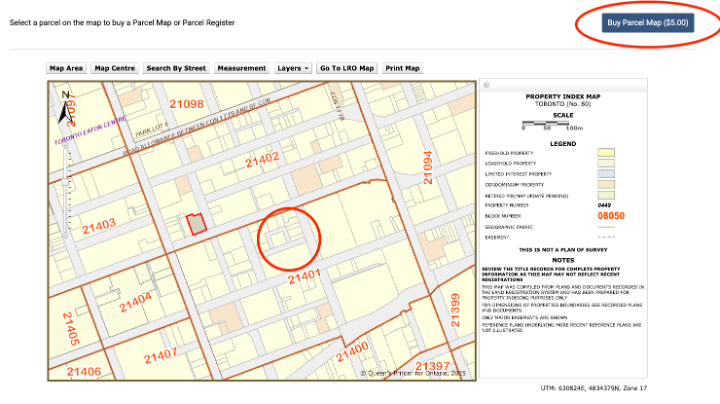
For instance, searching for “20 Adelaide Street E” in Google Maps will show the building’s position relative to roads and landmarks. You can then compare Google Maps to the ONLAND Maps to confirm the correct property. (See two screenshots below where you can identify the property by matching the distinguishable street features between Google Maps and ONLAND Maps.)
Identifiable features such as lakes, dead-end streets, or corners can also help you locate farmland or cottage properties.
Step Three: Purchase the Parcel Register
Once you’ve located the correct property on the ONLAND Maps, select “Buy Parcel Map”. After paying the $5 fee, the assigned PIN for the selected property will be displayed, allowing you to then purchase the parcel register.
This parcel register will provide detailed ownership and encumbrance information for the property. In my next blog, we will explore how to interpret parcel register data and how to search by instrument.
Jennifer Jiang
Nothing contained in this post constitutes legal advice or establishes a solicitor-client relationship. If you have any questions regarding your legal rights or legal obligations, you should consult a lawyer.
